Tia could have described her dream kitchen down to the cabinet hardware. The problem? All of it lived in her head - and in 3,000 Pinterest pins. Mark, meanwhile, cared less about backsplashes and more about “a yard big enough for a grill and a dog.”
They agreed on one thing: their current apartment wasn’t it. But between interest rates, down payment anxiety, and the endless scroll of listings, home-buying felt like trying to solve a jigsaw puzzle in the dark.
One Sunday, after they’d argued about whether a listing was “charming” or “tiny,” Tia opened LunaBoard and said, “Let’s stop fighting in the comments section of Zillow and build our own picture first.”
Defining “Home” Before Defining “House”
Their board was called “Home, Not Just a House.”
At the top, they made three text blocks:
- “How we want weekdays to feel”
- “How we want weekends to feel”
- “How we want guests to feel”
Under each, they listed quick phrases:
- “Weekdays: not racing each other to the bathroom, quiet corners to work”
- “Weekends: sunlight, space to cook together, somewhere to put folding chairs that isn’t the bedroom”
- “Guests: ‘Stay as long as you want’ energy, not ‘Sorry, there’s nowhere to sit’”
Only then did they start pulling in images. Not just Pinterest-perfect kitchens - but:
- An entryway with hooks and a bench (somewhere to drop bags)
- A simple backyard with patchy grass and a cheap grill
- A cozy living room with bookshelves instead of giant TVs
Suddenly, the dream felt less like a mansion and more like something they could actually own.
Bringing Zillow Into the Vision (Without Letting It Take Over)
Next came the listings.
Instead of sending links back and forth, they dragged them directly onto the board. Each house popped in with a rich preview: photo, price, address. Next to each, they added a sticky note with:
- Commute times for both of them
- Monthly payment estimate
- One “green flag” and one “yellow flag”
They created three sections:
- “Absolutely Not”
- “Maybe If…”
- “Let’s See It”
The first section filled up shockingly fast. What looked cute in the app didn’t hold up when compared to their “How we want life to feel” notes.
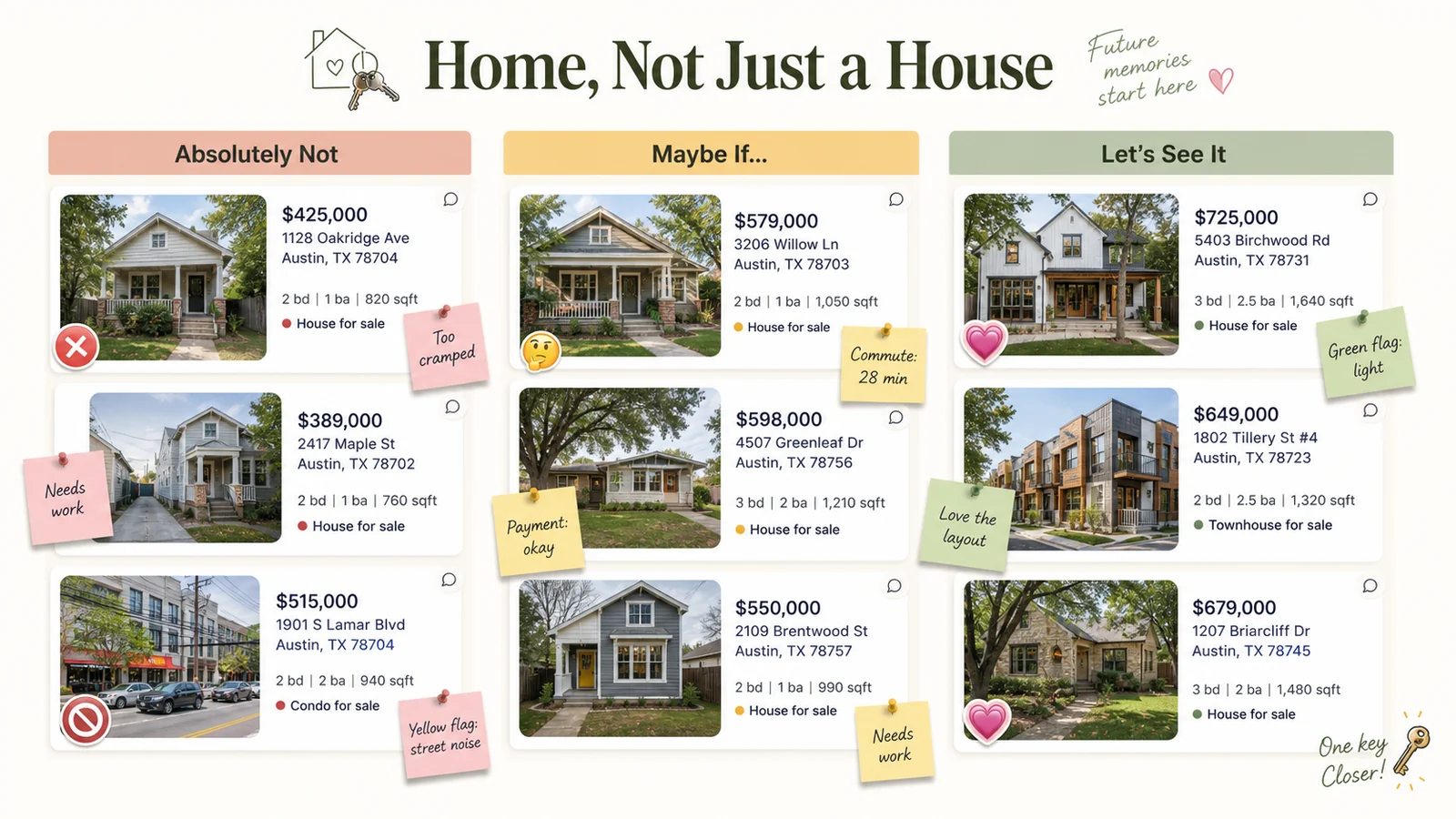
It stopped being about whether a house was objectively good. It became about whether it fit their picture.
Touring With a Board Instead of Just a Checklist
When they started doing in-person showings, the board came with them - on Tia’s phone.
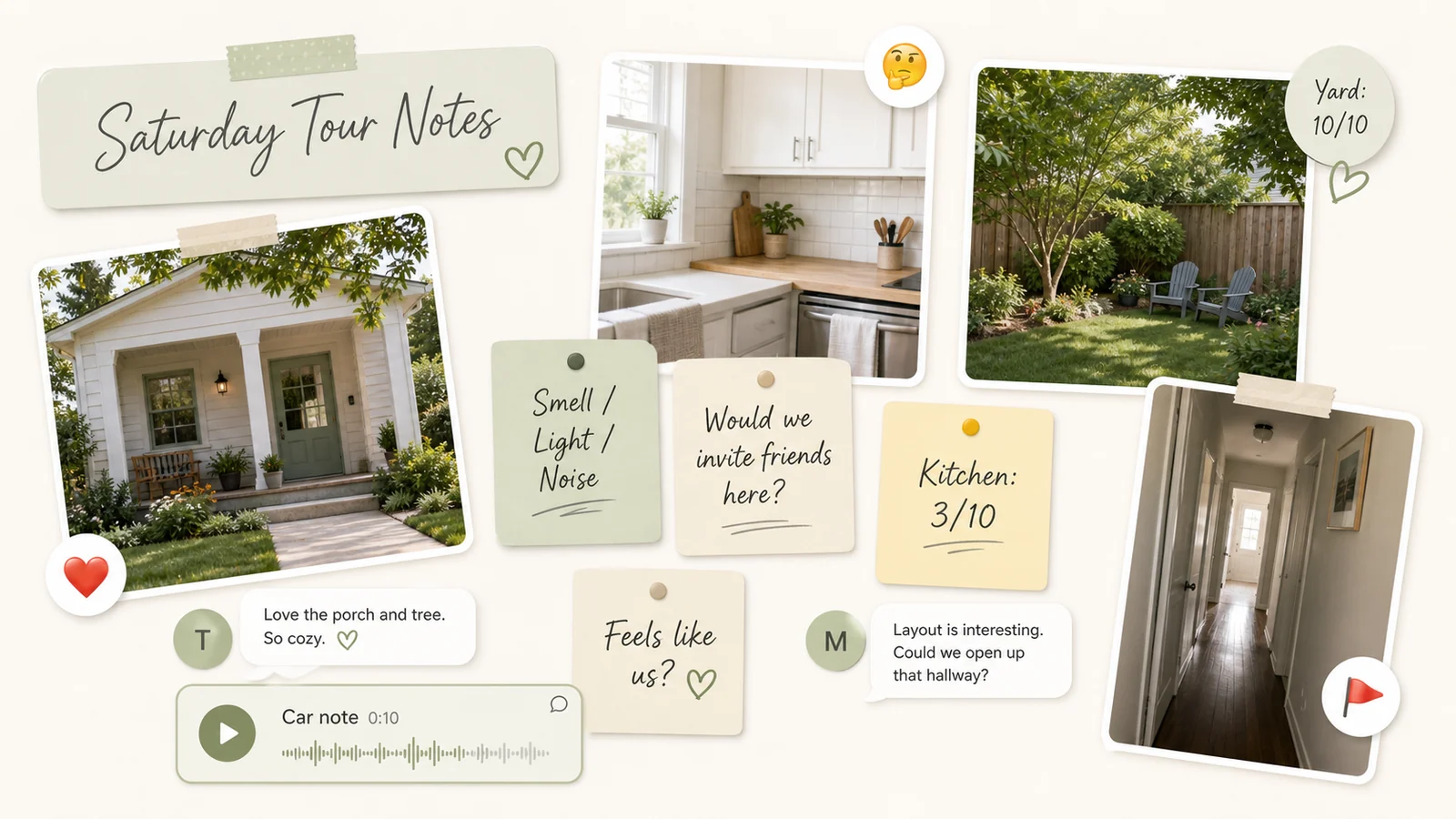
Every house on their tour got its own little cluster:
- A photo they took themselves (not just listing images)
- A sticky note with “Smell / Light / Noise” impressions
- A quick “Would we invite friends here?” gut check
Back home, they added:
- A reaction (❤️, 🤔, or ❌) from each of them
- A voice note if something really stood out - good or bad
At one house, the yard was everything Mark had ever wanted. But the inside felt dark and closed-off. In the car, they recorded a quick note: “Yard: 10/10. Kitchen: 3/10. Both of us feel weirdly heavy thinking about winter here.”
That note ended the argument before it began.
The House That Wasn’t “Perfect,” But Was Right
The house they ended up buying wasn’t the one with the best photos. It was the one whose cluster on the board kept quietly calling them back.
It had:
- Big windows and an open-ish kitchen (Tia’s dream)
- A yard big enough for Mark’s grill and imaginary dog
- A commute that didn’t destroy their evenings
When they zoomed out on the board, this house sat at the intersection of a lot of little things:
- More ❤️ reactions than any other
- Fewer “but…” notes
- A surprising number of “Feels like us” comments
So they moved it into a new section called “Let’s Be Brave” and added a big, shaky text block: “Offer?”
Turning the Vision Board Into a “New Home” Board
Once the offer was accepted, Tia didn’t archive the board. She duplicated it and renamed the copy “Life Inside These Walls.”
The new version kept:
- One image from the listing that made them smile
- A scaled-down budget cluster (this time for furniture and small projects)
- A “First Year Wins” section, where they’d later add photos and notes
They started planning:
- A mini kitchen refresh with paint and hardware instead of a full reno
- A backyard “phase one” (cheap chairs, string lights, a borrowed fire pit)
- A list of “we can live with this for now” items
Six months later, that board looked very different. Some images had little ✅ stickers. Others had ❌, with notes like “Decided we don’t actually care about this.” The point wasn’t that everything came true. It was that everything had been examined.
Frequently Asked Questions
What is a home buying vision board?
It’s a visual tool where you bring together inspiration images, real listings, budgets, and notes to clarify what “home” means to you. Instead of chasing whatever’s on the market, you’re measuring options against a picture you’ve created on purpose.
How specific should I be with my dream home vision board?
Specific enough that it guides decisions, not so specific that it makes you reject great-but-imperfect homes. Focus on non-negotiable feelings and a few key features (light, layout, location) rather than an exact number of bedrooms or a particular tile.
Can a home vision board help if I’m not ready to buy yet?
Yes. You can start by defining your “someday home” and using it to guide smaller decisions: what you buy now, where you rent next, what you save for. The board can evolve as your finances and priorities change.
How do I use LunaBoard with a partner for house hunting?
Create a shared board, add listings with rich link previews, and let each of you leave comments, reactions, and voice notes. Use sections for “No,” “Maybe,” and “Yes,” and revisit them together each week instead of arguing from memory.
Conclusion & Gentle Next Step
When Tia and Mark stood in their empty living room on move-in day, the house didn’t look like their board yet. No plants, no art, no cozy anything. But they knew why they’d chosen it, and they knew how they wanted life inside it to feel.
If your dream home is stuck in your head or scattered across apps, give it a single, honest canvas. Start a home vision board in LunaBoard - part wish list, part decision tool - and let it walk with you from “someday” to actual keys in your hand.