Maya loved the ritual of gluing pictures to a poster. She hated, however, that her board lived behind the bedroom door, half-hidden by a robe, slowly curling at the edges. By March, she’d stopped looking at it. By April, her cat knocked it flat. By May, she couldn’t remember half of what was on it.
So when a friend showed her a digital vision board on LunaBoard, open on both her laptop and phone, something clicked. Maybe the point wasn’t the cardboard. Maybe the point was being able to see - and update - her vision without redoing the whole thing every time life shifted.
The Moment Paper Stops Working
The real breaking point came when Maya got a surprise job offer.
She was thrilled, but her old board screamed “freelance dream girl energy”: coffee shops, flexible hours, travel. None of that matched the structured role in front of her. She considered ripping off half the photos and starting again, but that felt like tearing down a year of dreaming.
Instead, she opened a blank LunaBoard and named it: “Next Chapter.”
At the top, in a text block, she wrote: “What if this job is a bridge, not a cage?”
It was the first time her vision board felt like it could move with her instead of freezing her in one version of the future.
Step 1: Set Up Your Digital Canvas
Maya started simple. No templates, no pressure to make it pretty.
She added three big text labels:
- Work & Money
- Life at Home
- Future Adventures
Under each, she dropped in a few images from her old board - only the ones that still felt true. Then she pulled in new visuals:
- A calm office setup for days at the company
- Screenshots of the job description with phrases highlighted
- A photo of a carry-on suitcase to remind herself travel was still part of the plan
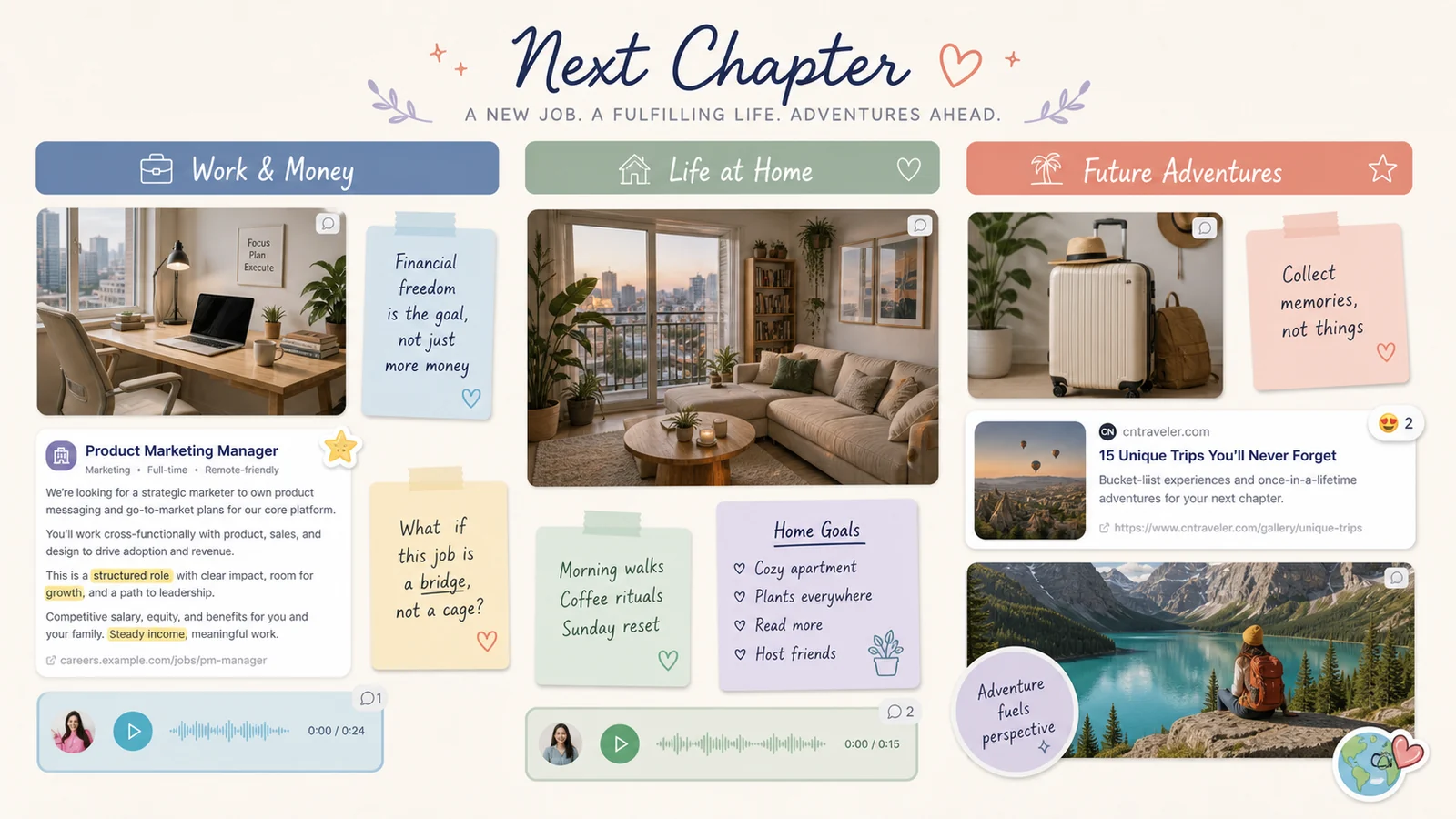
The magic wasn’t the aesthetic (yet). It was the feeling of permission: she could bring old dreams into a new container.
Step 2: Add the Real-World Links Your Paper Board Can’t Hold
Maya realized one of her biggest frustrations with paper boards was the “now what?” problem. Okay, she wanted a brighter apartment. Great. Where were the apartments?
This time, as she browsed listings, she dragged Zillow links directly onto the board. Each became a rich preview: photo, price, street name. Same with flights for that “future Italy trip” and a savings account article she didn’t want to forget.
Suddenly, the board wasn’t just inspiration. It was a launchpad.
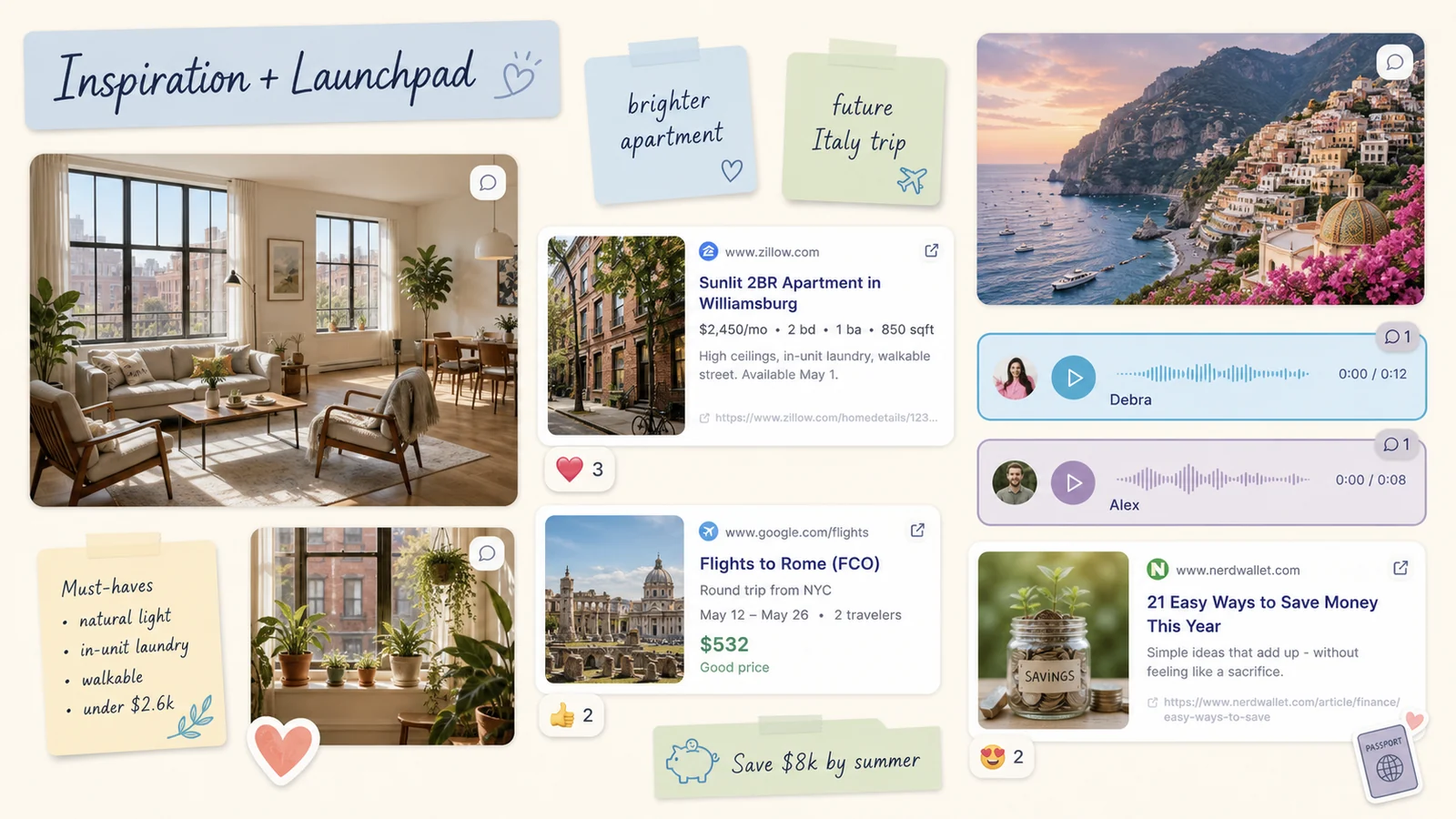
You can do the same with:
- Airbnb stays and hotel pages
- Blog posts that explain strategies you want to try
- YouTube videos or Instagram reels that genuinely motivate you
The goal isn’t to clutter your board with links; it’s to keep the “how” only one click away from the “why.”
Step 3: Use Voice Notes to Capture the Parts You Can’t Pin
A few weeks into the new job, Maya had a small win: a presentation that went way better than expected. Walking home, she opened her LunaBoard on her phone and tapped the microphone icon.
“Hey future me,” she laughed. “You were so scared of this job. But look - you’re actually good at this.”
She dropped that voice note onto an image of a woman speaking confidently in a meeting.
On rough days, she played it back. It didn’t sound like a generic affirmation. It sounded like proof from someone she trusted: herself.
You can use voice notes for:
- Celebrating small wins in real time
- Leaving reminders for your future self (“Do not say yes to another committee”)
- Letting your partner or best friend add their encouragement directly on your board
Step 4: Reorganize Without Starting Over
By fall, Maya’s “Next Chapter” looked nothing like it had in May - and that was the point.
She’d:
- Shrunk images that no longer felt urgent
- Moved “Future Adventures” closer to the center once vacation time kicked in
- Added a “Money Moves” mini-cluster for savings goals and debt payoff
In a paper world, this would have meant scissors and tape… or a whole new board. In LunaBoard, it was just drag, drop, breathe.
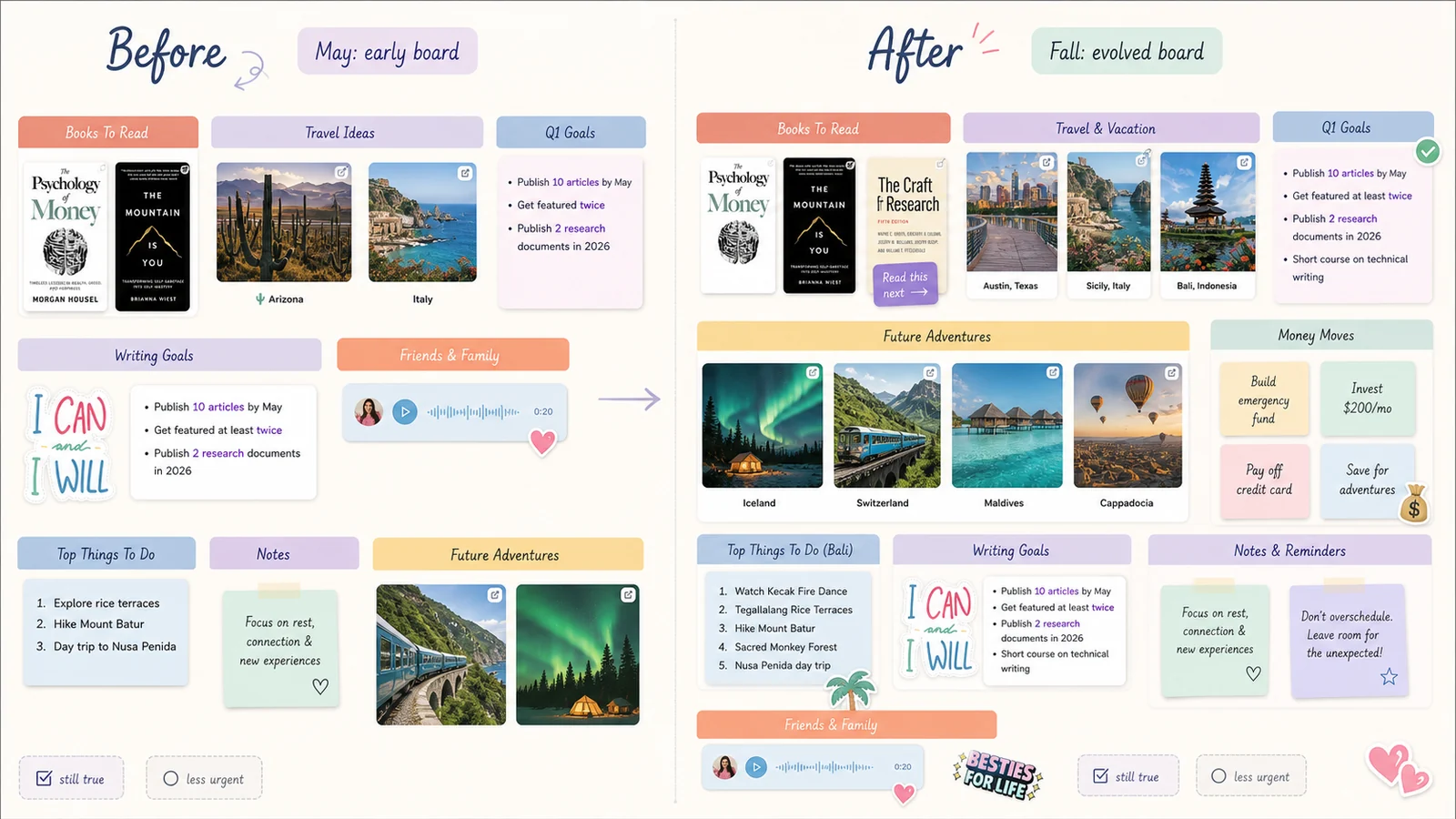
A digital vision board wins not because it’s trendy, but because it lets your vision evolve without punishing you for changing.
Frequently Asked Questions
Is a digital vision board really better than paper?
“Better” depends on how you live. Digital boards are easier to update, duplicate, and access on the go, which means you’re more likely to look at them regularly. Paper boards can feel tactile and special, but they’re harder to change without starting over.
Can I still have a physical version if I build my board online?
Absolutely. Many people create their board in an app, then export a snapshot to print or use as a lock screen. That way, you get the flexibility of digital plus the visibility of something you can hang or frame.
What tools can I use to make a digital vision board?
There are lots of options: general design tools, online whiteboards, and dedicated vision board makers. LunaBoard focuses specifically on collaborative, infinite-canvas boards with images, links, voice notes, and comments - so it works especially well if you’re planning with a partner, family, or friend group.
How often should I update my digital vision board?
Think in seasons, not emergencies. A quick monthly check-in plus a deeper refresh each quarter is plenty. You don’t need to constantly tweak it; you just want it to stay honest.
What if I miss the “craft” side of cutting and gluing?
You can absolutely keep that ritual. Try doing a small physical board for one theme (like travel or self-care) and a larger digital board for your whole life. Or make a “craft night” board in LunaBoard with friends, adding stickers and doodles instead of glue.
Conclusion & Gentle Next Step
Maya still smiles at the memory of those toppled poster boards. But the version of her that opens her digital board on the train home, listens to her own voice note, and sees actual next steps alongside her dreams? That version gets further.
If you’re ready to let your vision grow with you instead of living on a piece of cardboard, start a digital board on LunaBoard. You can always light a candle and make it a ritual - no glue stick required.