Lena thought getting engaged would feel like the movies. Instead, it felt like opening 47 browser tabs and arguing about whose Pinterest board was “more organized.”
They knew they wanted a $30K wedding in Austin - big enough to feel special, small enough not to drown in debt. What they didn’t know was how to get their ideas, links, opinions, and families in one place without turning every conversation into a meeting.
So one night, after yet another “wait, which venue link was that?” argument, Chris opened LunaBoard and said, “What if we just put it all here?”
Turning Chaos Into One Wedding Home Base
They started by creating a board called “Austin Wedding - Big Picture” and invited each other in. No vendors, no moms. Just them.
On the left, they made four columns:
- Venues
- Food & Drink
- People & Moments
- Money Stuff
On the right, they left a big blank space called “Vibes.” That’s where Lena dropped the dreamy photos: terracotta details, twinkle lights, late-summer flowers. Chris added pictures too - mostly of dance floors and good shoes.
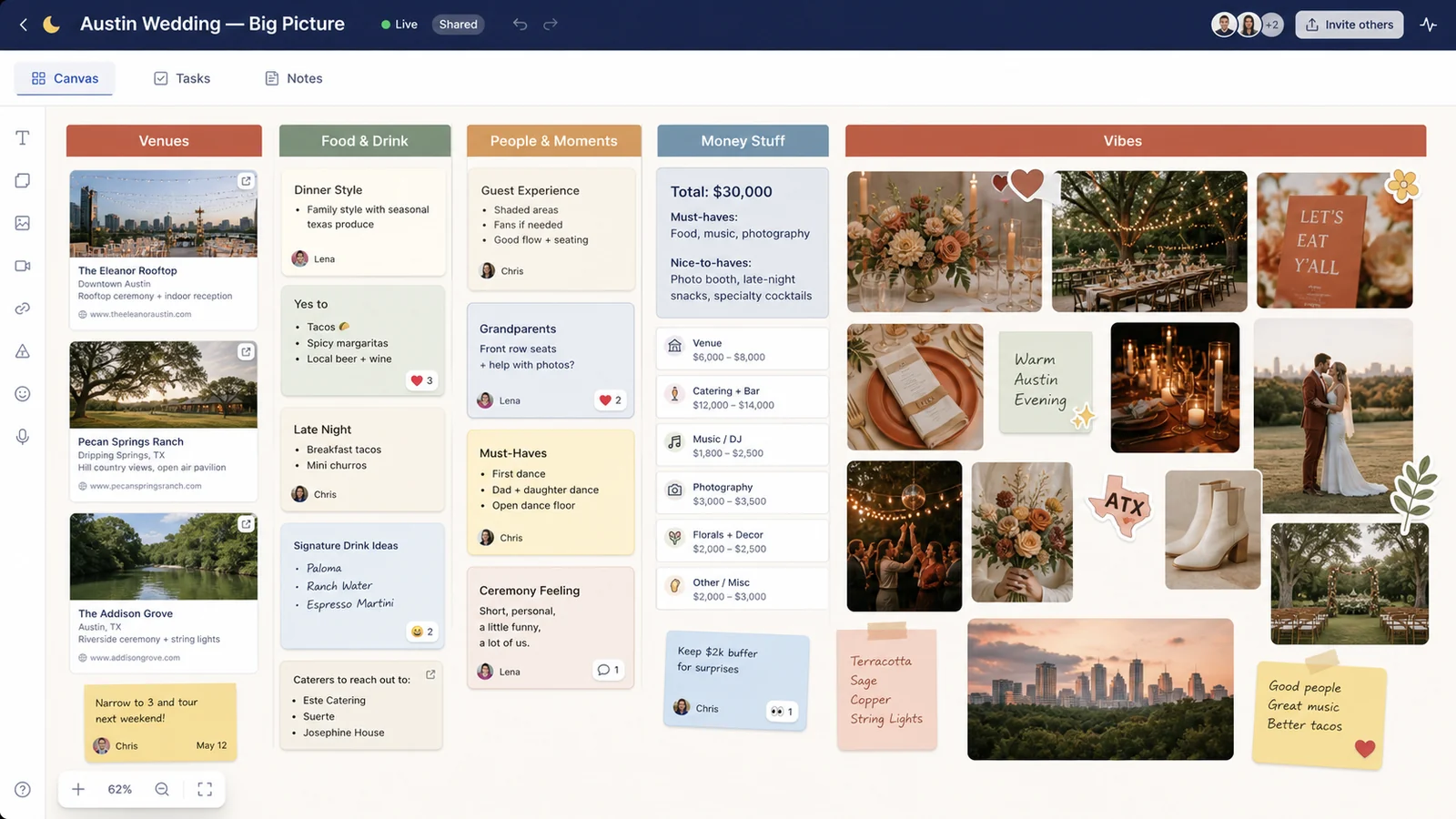
For the first time, they could literally see where their brains overlapped.
Venues: From Fifteen Tabs to Three Real Options
They gave themselves one week to add any maybe-venue to the board. Every time they found a contender, they dragged the link into the Venues column. LunaBoard pulled in rich previews: main photo, name, and basic info so they didn’t have to click every time.
Next to each, they added a sticky note with three bullets:
- Capacity
- Price range
- “Non-negotiables check” (outdoor space, backup plan, late-night noise rules)
Lena loved a fancy downtown rooftop. Chris was obsessed with a hill country ranch. But when they looked at the board, something else stood out: a slightly smaller venue by the river, covered in their favorite reaction - ❤️ and ✨.
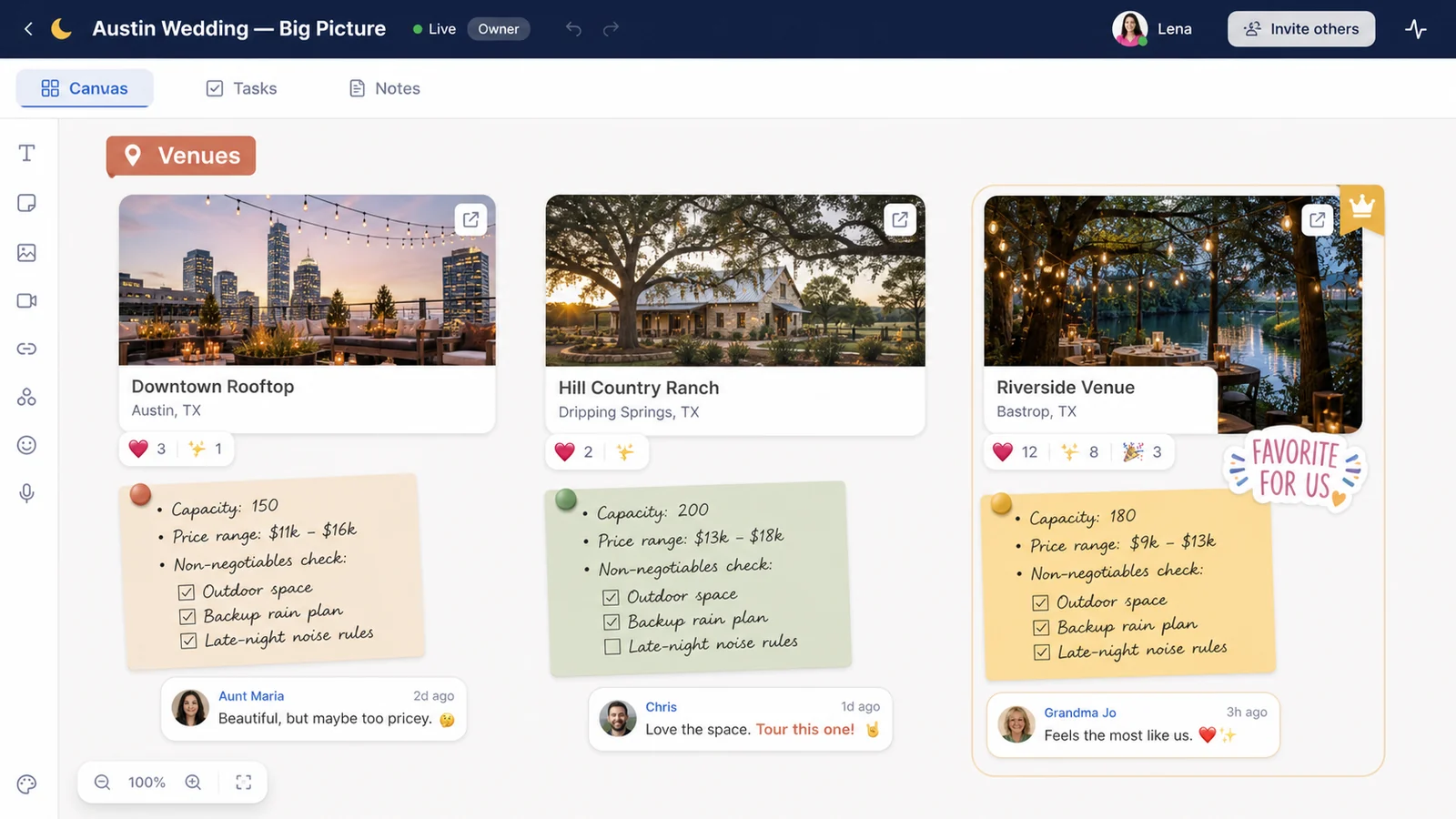
Instead of rehashing the same debate, they could say, “Okay, the board is pretty clear. These three get tours. The rest are nice to look at but not realistic.”
Money: Making the Budget Visible (And Less Scary)
Talking about the $30K budget felt heavy - until they turned it into visuals.
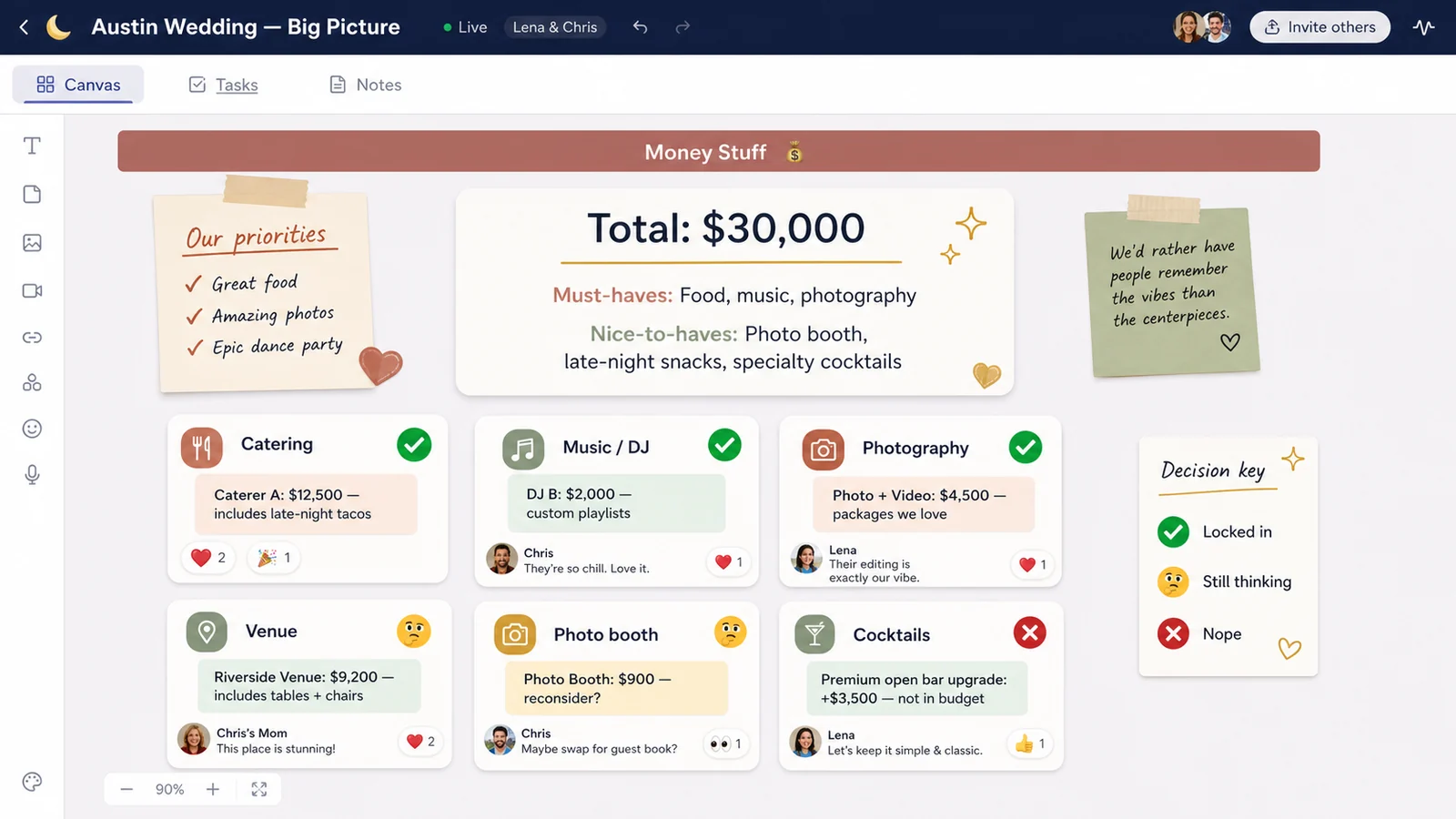
In the Money Stuff column, Chris added a simple text block:
- Total: $30,000
- Must-haves: Food, music, photography
- Nice-to-haves: Photo booth, late-night snacks, specialty cocktails
Then they created cards for each category with rough target numbers. Whenever a real quote came in, they updated the sticky notes:
- “Caterer A: $12,500 - includes late-night tacos”
- “DJ B: $2,000 - open to custom playlists”
- “Photo Booth: $900 - reconsider?”
They used stickers as quiet decisions:
- ✅ for “locked in”
- 🤔 for “still thinking”
- ❌ for “nope”
It turned into a visual budget map instead of a scary spreadsheet.
Family Opinions Without Group-Text Chaos
Once they felt grounded, they made a second board: “Family Wedding Peek.”
This one had copies of the key things they wanted input on:
- Three venue options
- Two dress styles Lena liked
- A sample menu
- A section labeled “Traditions?”
They invited parents and siblings and explained the rules: comments and reactions only, no side texts.
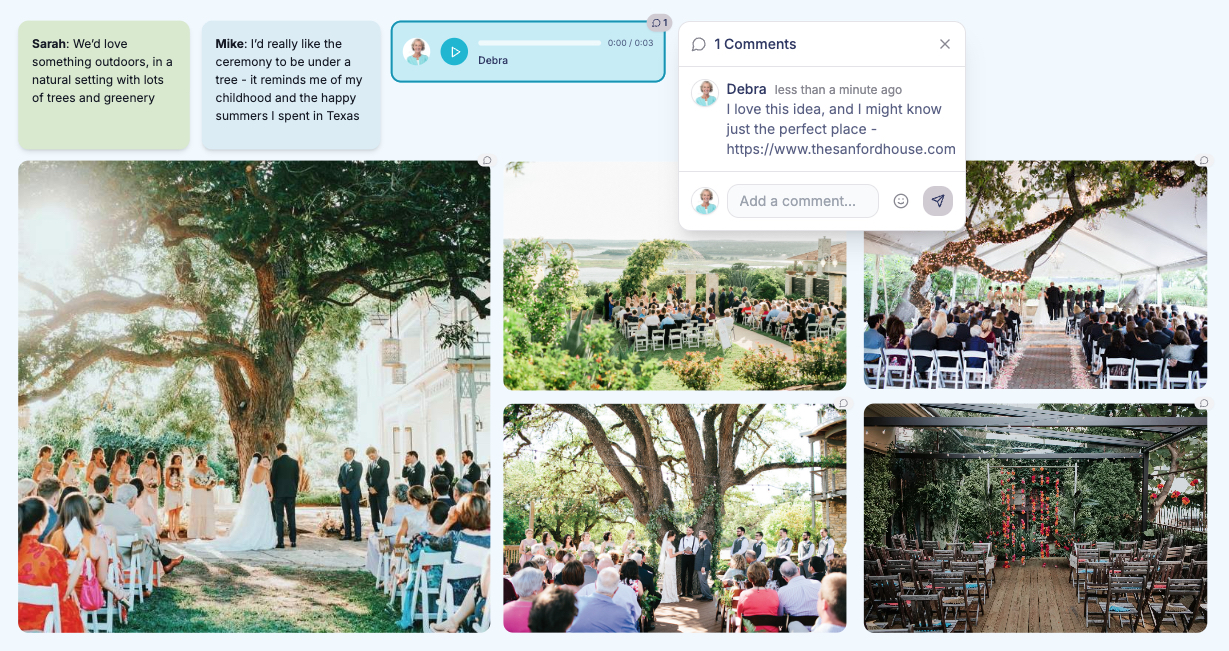
When Chris’s mom saw one venue, she left a comment: “This looks like where your grandparents danced when we first met. Crying already.” Lena’s dad dropped a voice note under the menu: “As long as there’s something spicy and something I can pronounce, I’m good.”
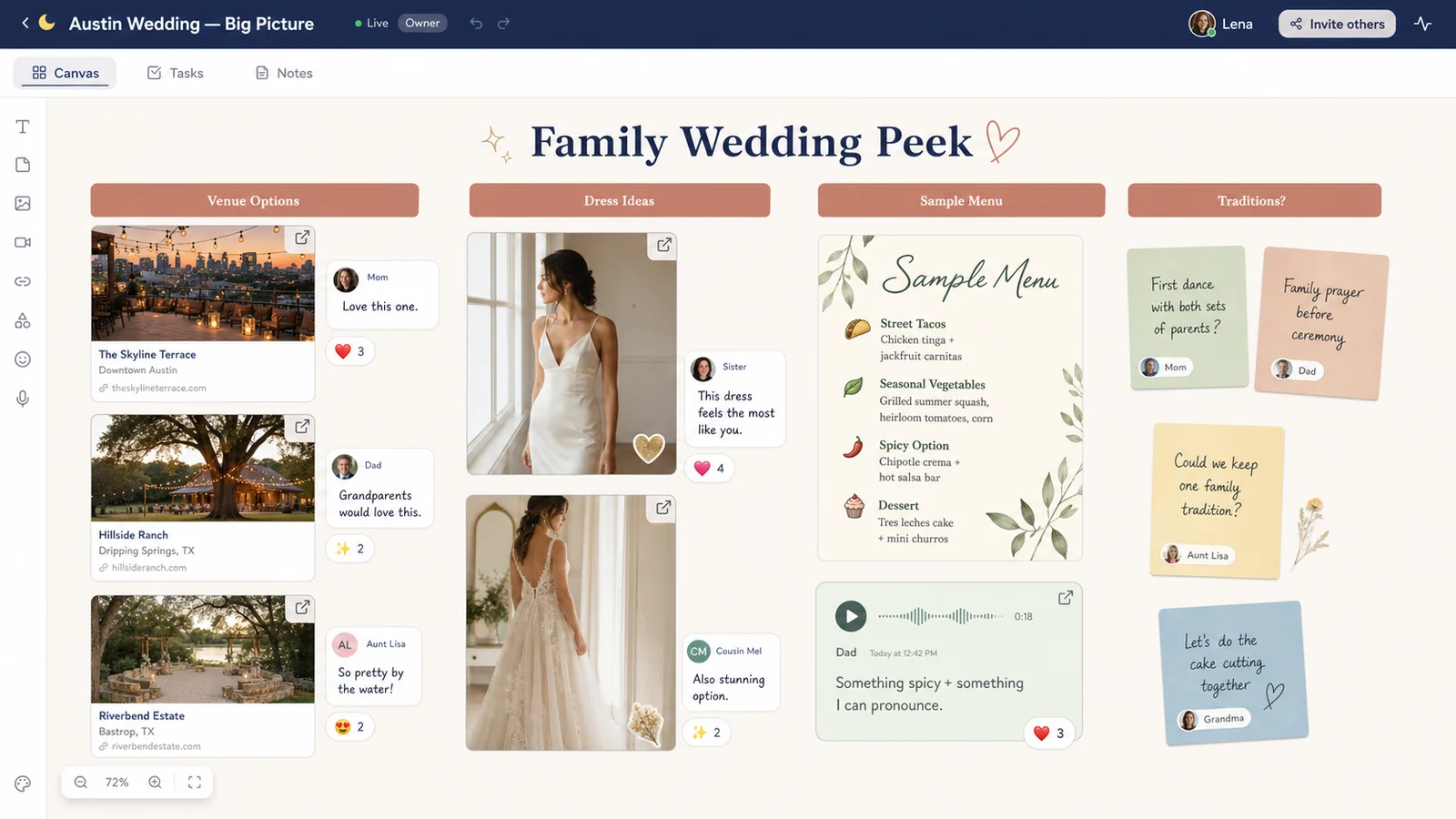
The board became the place for emotions and opinions, so their phones didn’t have to be.
Tiny Decisions, Fewer Fights
The best part wasn’t some huge breakthrough. It was the hundreds of tiny frictions they avoided.
Instead of texting “I don’t like that flower arrangement,” Lena would just react with 👀 on the board - code for “let’s talk.” If they couldn’t agree on table settings, they each added their version, invited two trusted friends, and asked them to drop a quick ❤️ on their favorite.
Nobody “won.” The board did.
When they got overwhelmed, they zoomed out and looked at the People & Moments section: photos of grandparents laughing, a first dance picture of another couple, a note that said, “We want guests to leave saying, ‘That felt like you.’”
It kept them grounded in why they were doing this at all.
Frequently Asked Questions
Do we really need a wedding vision board, or is this just extra work?
You don’t need anything. But a shared board can save you from arguing about the same details on loop, because you’re both looking at the same information. It becomes your one home base for links, inspiration, quotes, and decisions.
How detailed should our wedding vision board be?
Start broad - overall vibe, rough budget, non-negotiables - then get more detailed as you go. You don’t have to know your napkin color on day one. Let the board evolve from “mood” to “plan” over time.
What if our families have strong opinions?
A separate family-facing board can help. Share the choices you genuinely want feedback on, and invite comments there. That way, you can see everyone’s thoughts in context, instead of trying to track opinions across texts, emails, and calls.
Can LunaBoard replace our wedding planner or spreadsheets?
Think of LunaBoard as your visual hub, not your entire system. It’s where vision, links, notes, and conversations live. You can still use a planner, Google Sheets, or a wedding checklist app - but they’ll all make more sense if your shared “why” and “what it should feel like” live on a board you both see.
Conclusion & Gentle Next Step
Lena and Chris didn’t get a “perfect” wedding. They got something better: a day that felt like them, at a price they chose together, with fewer late-night fights about centerpieces.
If you’re staring down a pile of tabs and a swarm of opinions, give your wedding its own home base. Start a shared LunaBoard, throw everything on it, and let the board help you see what actually matters - for both of you.