Rina loved “new year energy.” She also loved buying systems.
January 1st:
- She unboxed a linen-covered planner with gold edges.
- She downloaded yet another task app.
- She spent hours making a digital vision board full of beaches, book deals, and cozy dinner parties.
By February, the planner was buried under mail, the task app pinged 40 times a day, and the vision board lived in a forgotten browser tab. The problem wasn’t that any of these tools were bad. It was that she was asking each one to do the wrong job.
What Each Tool Is Actually Good At
Here’s what she eventually learned:
- Vision board = your why and big picture. It helps you see what you want life to feel and look like. It’s not where you track every detail - more like your North Star. - Goal planner = your medium zoom. It’s where you translate pieces of the vision into specific goals, timelines, and checkpoints - monthly, quarterly, yearly. - Task app = your zoomed-in today. It handles the moving parts: errands, deadlines, reminders. It’s reactive and detailed.
In LunaBoard, that last layer does not have to live somewhere separate. The same board can hold the big-picture canvas and a task planning view where tasks are grouped, given due dates, and assigned to yourself or someone else.
Her mistake was trying to make each tool do everything. Once she gave them distinct roles, they finally played together instead of competing.
Step 1: Let the Vision Board Be the Dream, Not the Dashboard
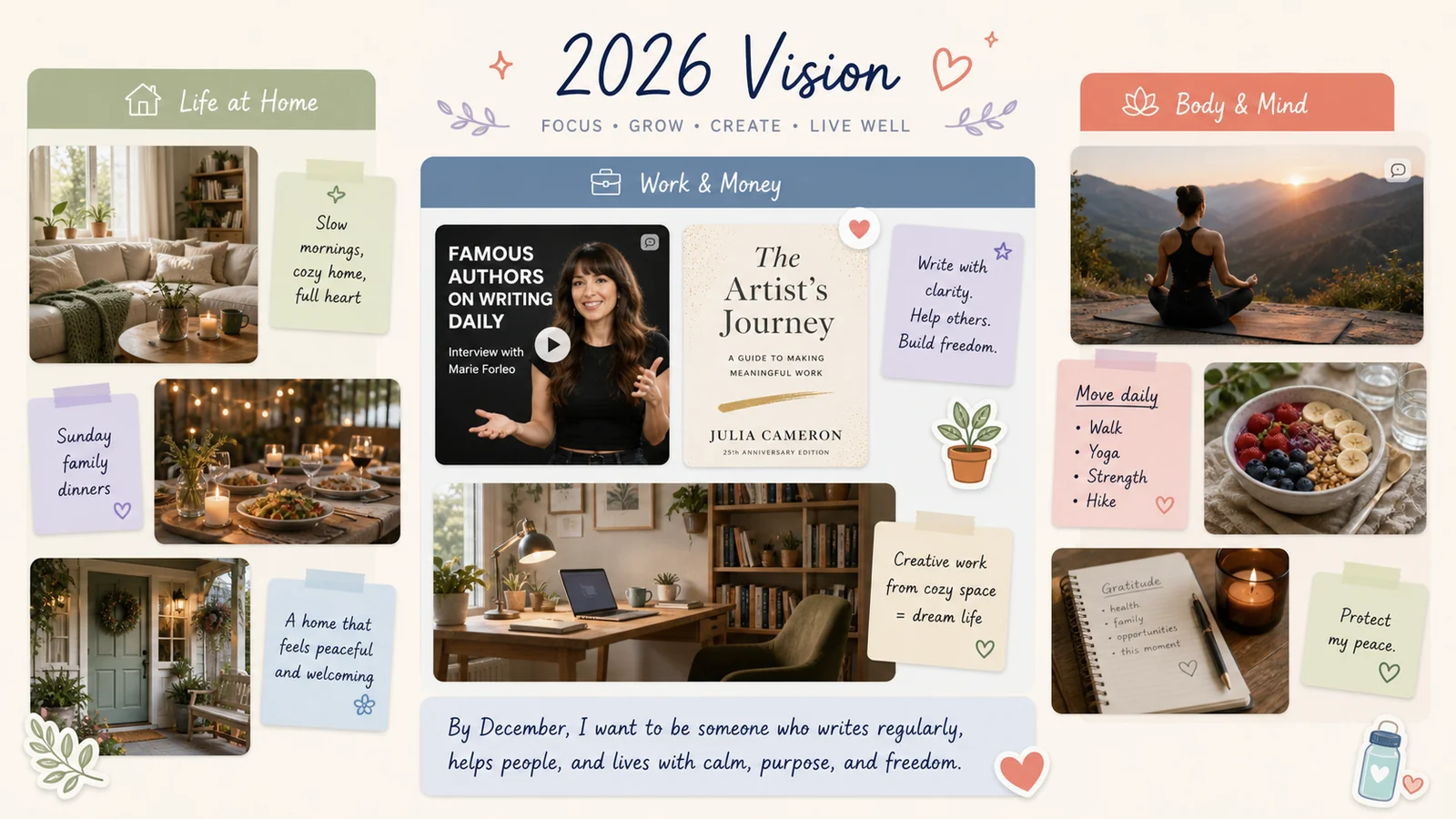
Rina rebuilt her 2026 vision board in LunaBoard with three big regions:
- “Life at Home”
- “Work & Money”
- “Body & Mind”
Under “Work & Money,” she added:
- A screenshot of an author she admired
- A mock cover of the book she wanted to write
- An image of a cozy office, not a giant corner one
Then she added one text block: “By December, I want to be someone who writes regularly, not just someone who wants to be a writer.”
No deadlines. No task lists. Just a clear story.
Step 2: Use the Planner to Translate Vision Into Realistic Goals
On Sunday afternoons, she’d open her planner and her LunaBoard side by side.
From the “Work & Money” cluster, she identified one “this quarter” piece: “Start writing consistently.”
In the planner, that became:
- A quarterly goal: “Write 2 rough chapters by March 31.”
- Monthly milestones: “Jan - outline; Feb - chapter 1; Mar - chapter 2.”
- Weekly focus: “Block 2 hours on Wednesdays for writing.”
Her planner became the bridge between “book cover on the board” and “words on a page.” It held:
- Time blocks
- Check-ins
- Reflection prompts
But it didn’t have to hold the why. That lived on the board.
Step 3: Let the Task App Handle the Noise
The task layer was no longer invited to the big-picture party.
In LunaBoard, Rina kept that layer in the Tasks view attached to the same board. It got:
- “Wednesday 6 - 8 p.m. - Writing” recurring events
- “Email therapist about changing appointment time”
- “Buy new running shoes before Saturday”
She grouped tasks by area, added due dates, and assigned a few items to herself or to Alex when someone else was involved. That was it. When something popped into her head (“oh, I should…”), it went into tasks, not onto the vision canvas or planner. The task layer became a catcher, not a commander.
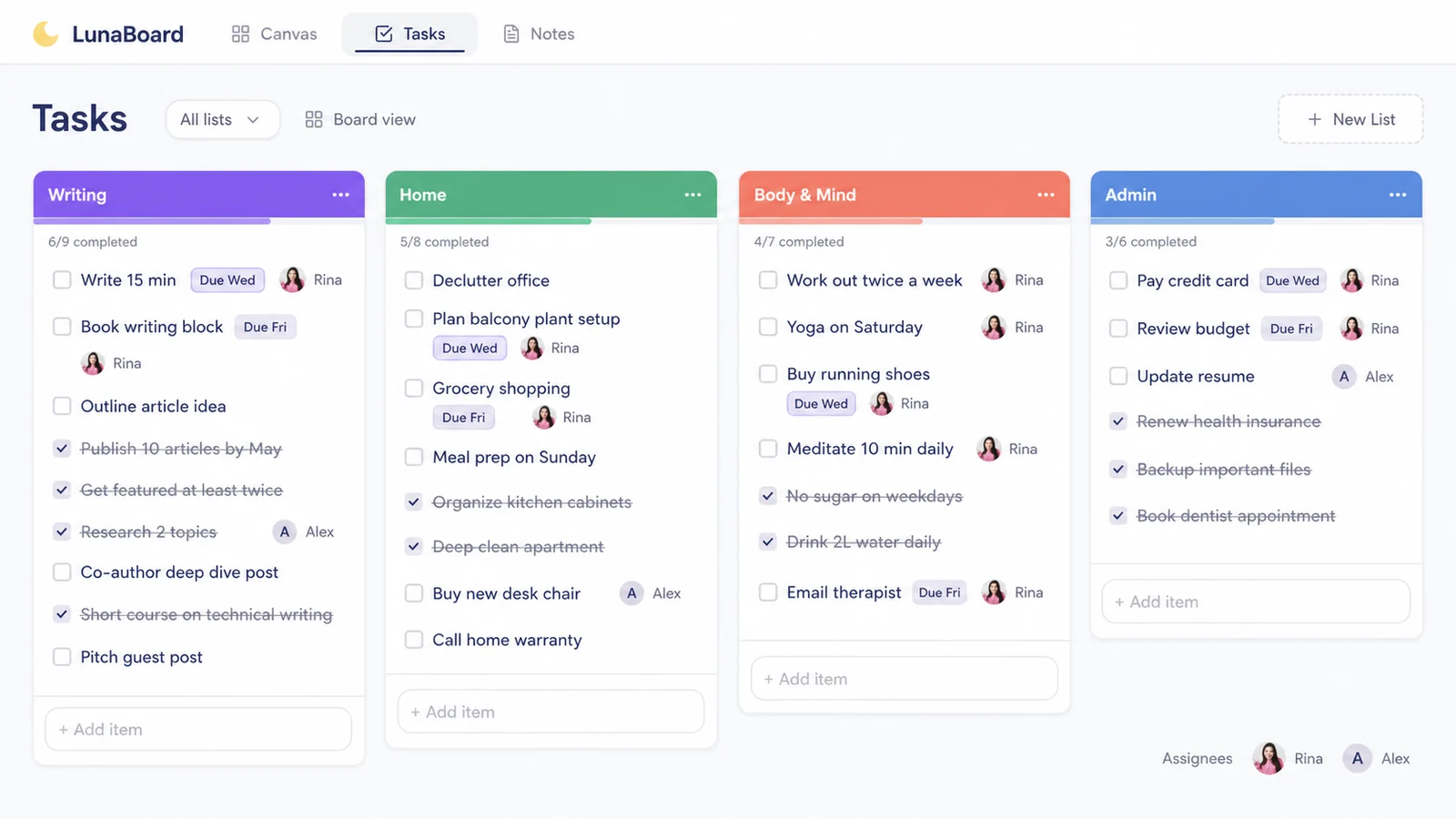
On Wednesday nights, she didn’t ask, “What should I do?” The vision board and planner had already answered that. She simply opened the task view to see the steps attached to that plan.
Putting It All Together Without Burning Out
The flow looked like this:
1. Monthly or quarterly: - Look at the vision board. - Ask, “Which 1 - 2 things from here do I want to move forward in this season?” - Update the board if something no longer fits. 2. Weekly (planner time): - Turn those seasonal pieces into specific, measurable goals. - Decide when you’ll make time for them, in real calendar blocks. 3. Daily (task app): - See what today’s commitments are. - Break bigger blocks into micro-tasks if needed (“open document,” “write for 15 minutes”).
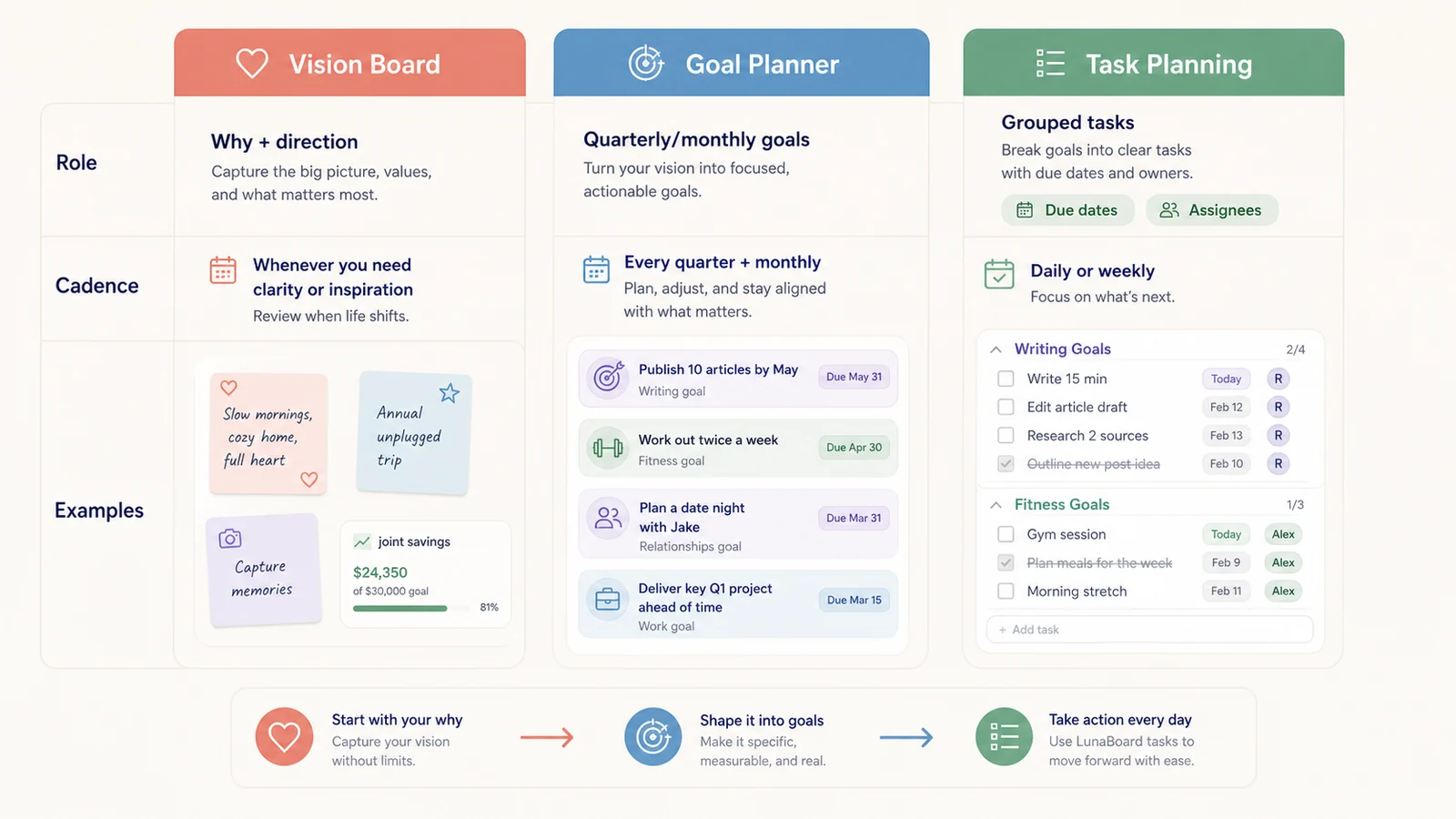
Rina stopped asking her planner to inspire her or her vision board to nag her. Each tool finally did its own job.
Frequently Asked Questions
Do I really need all three: vision board, planner, and task app?
Not necessarily. But most people benefit from at least two layers: one for big-picture “why” and one for concrete “when.” A vision board plus either a planner or a simple calendar can be plenty.
Can my digital vision board live with my planning system?
Yes. Many people keep their vision and some planning elements in one digital tool. In LunaBoard, for example, your canvas can hold the big-picture vision while Tasks holds grouped to-dos, due dates, and assignments for yourself or collaborators.
What if planning stresses me out?
Then shrink your planning horizon. Use your board just to name what matters this month, and give your planner one job: guard a small amount of time for those things. Your LunaBoard tasks can stay as minimal as “remind me to show up,” with only the due dates and assignees you actually need.
How often should I look at each tool?
As a rule of thumb:
- Vision board: weekly or whenever you need a reminder of your “why”
- Planner: weekly and briefly each day
- Task app: daily as needed, but not all day
Conclusion & Gentle Next Step
Rina stopped chasing the perfect system and started letting each tool be what it was meant to be. Her board became a story. Her planner became a bridge. Her app became a helper.
If your tools feel like they’re fighting instead of supporting you, step back. Clarify what you want each one to do - and if you’re missing a place for your “why,” give your vision its own canvas in LunaBoard.