The group chat had Opinions.
Sam wanted a brunch shower. Jade wanted a backyard picnic. Tori secretly wanted matching “auntie” shirts. And Camila - the mom-to-be - just knew what she didn’t want: cheesy games and awkward gift-opening in front of everyone.
Two weeks in, the chat was a mess of links, screenshots, and half-formed ideas. No one could remember which inspo photos Camila actually liked. That’s when Jade said, “Okay, we’re doing this the grown-up way,” and opened a LunaBoard.
She named it: “Baby C Celebration - Not Cringe Edition.”
Step 1: Center the Guest of Honor’s Actual Vibe
Before anyone added decor photos, Jade created three big text blocks:
- “Camila’s Yes”
- “Camila’s No”
- “We’re Not Sure Yet”
They hopped on a quick call with Camila and filled them in together.
Under “Yes,” they wrote:
- “Chill, cozy, not all eyes on me”
- “Latina touches (music, food, maybe colors)”
- “Polaroids, please”
Under “No,” they added:
- “No blue/pink ‘team’ stuff”
- “No ‘don’t say baby’ games”
- “Nothing that feels like a work event”
Only after that did they start dragging in images:
- A long table with simple flowers and mismatched chairs
- A dessert table with conchas and pastelitos
- A soft, sunny living room instead of a rented hall
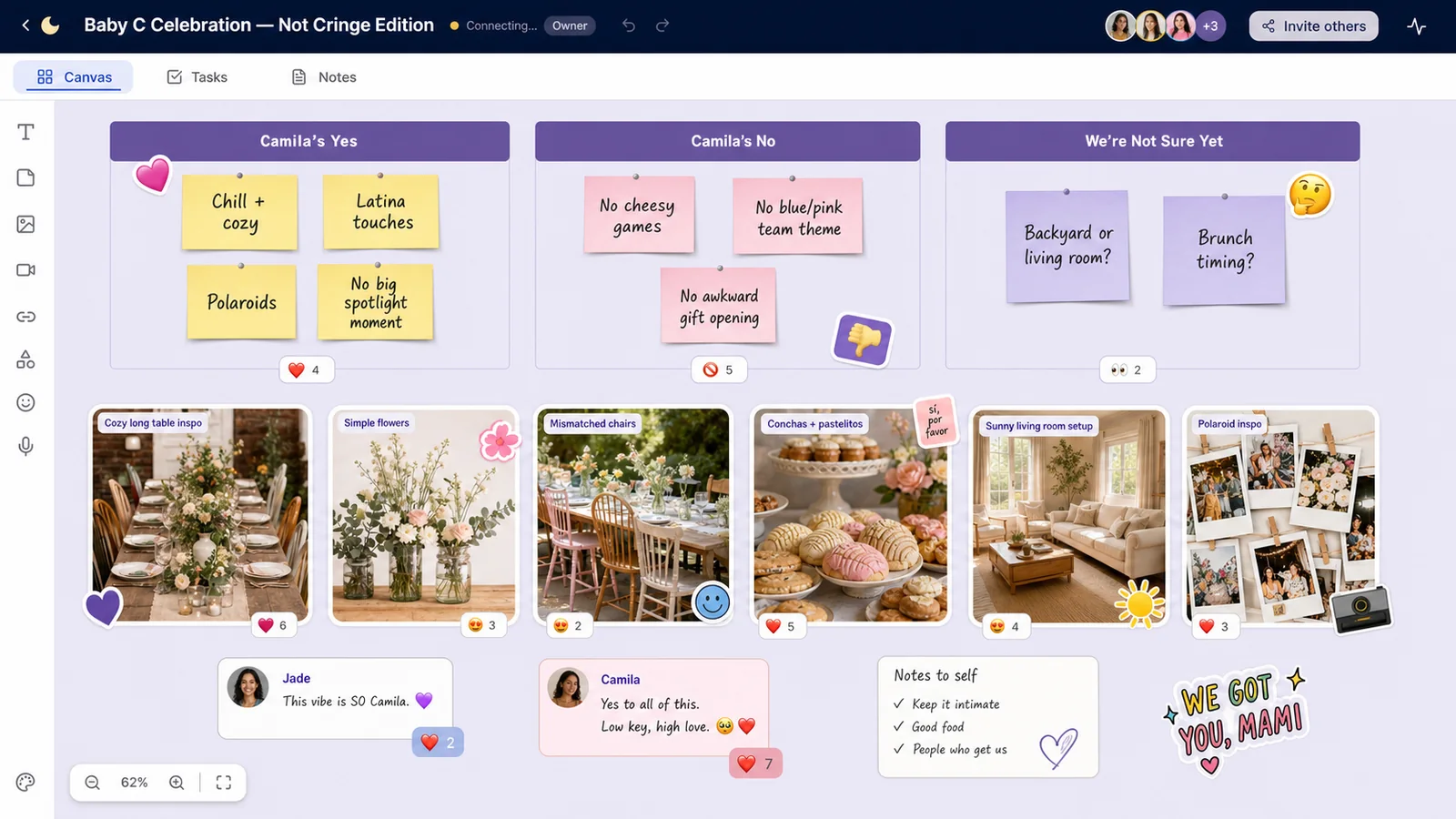
Already, it felt more like her.
Step 2: Cluster Ideas by Experience, Not Just Aesthetic
They created four sections:
- “Food & Drinks”
- “Moments & Activities”
- “Decor & Space”
- “Logistics (We’re Adults, Sadly)”
Under “Food & Drinks,” they added:
- Photos of brunch-style buffets
- A note: “Non-alcoholic options that still feel fun”
- Links to local panadería menus
Under “Moments & Activities,” they dropped:
- A “letters to baby” station photo
- A Polaroid guest book idea
- A playlist concept: “Songs Camila danced to in her 20s, but edited for tías”
Logistics got its own un-glamorous little corner:
- Budget range
- Guest count estimate
- Date options
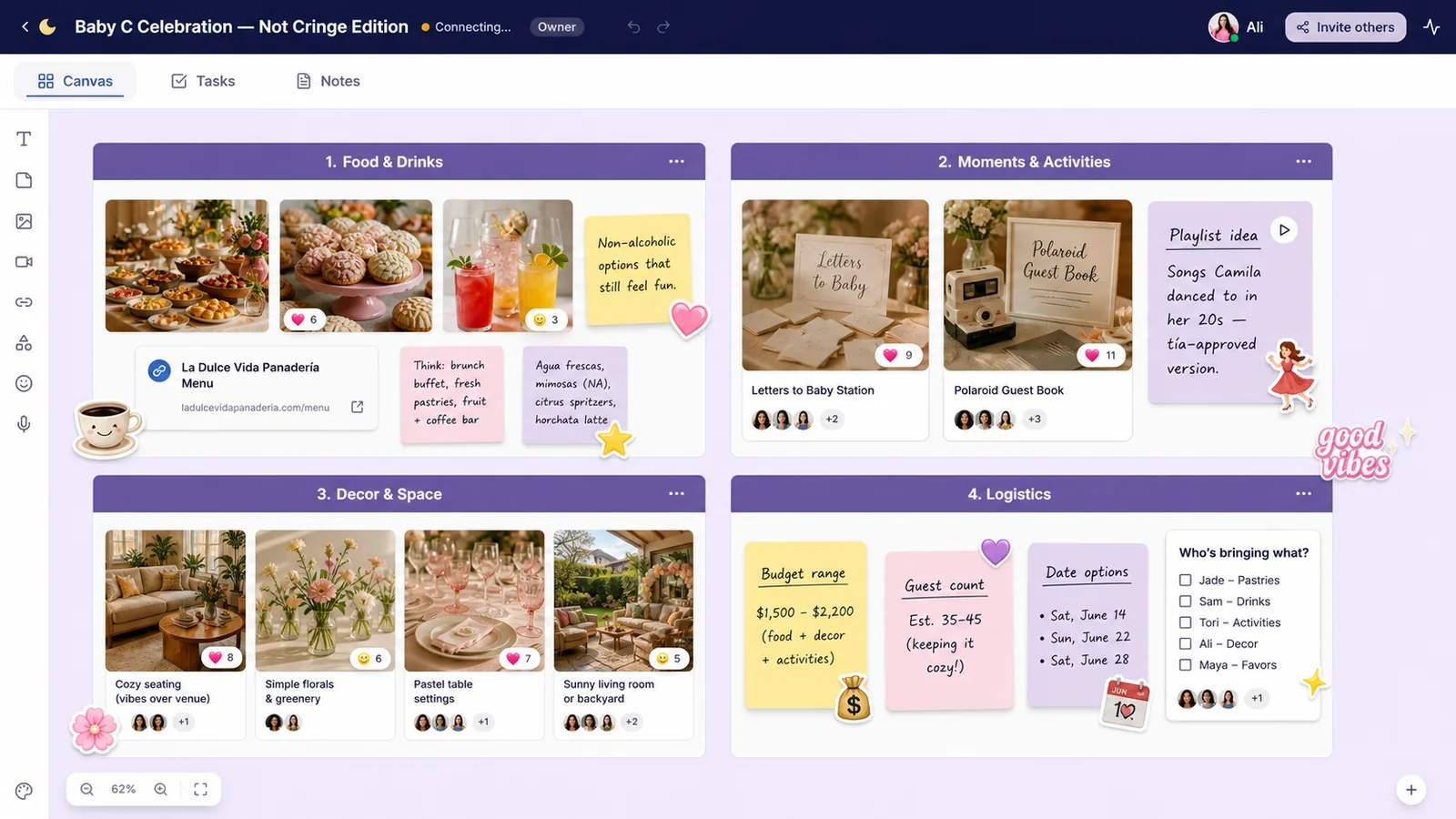
This made planning less about centerpieces and more about “What do we want people to feel at each part of this thing?”
Step 3: Use Comments and Reactions Instead of 500 Texts
Whenever someone dropped an idea onto the board, they stopped flooding the chat. They left it there and let others respond with:
- ❤️ for “love this”
- 🙂 for “fine either way”
- 👀 for “need to discuss”
Under a picture of a game-free “write a wish for baby” table, Camila herself left a comment: “This!!! Quiet, but meaningful. Also easier on my social battery.”
Under a photo of a giant diaper cake, someone added the note: “I will personally push this off the table if it appears.”
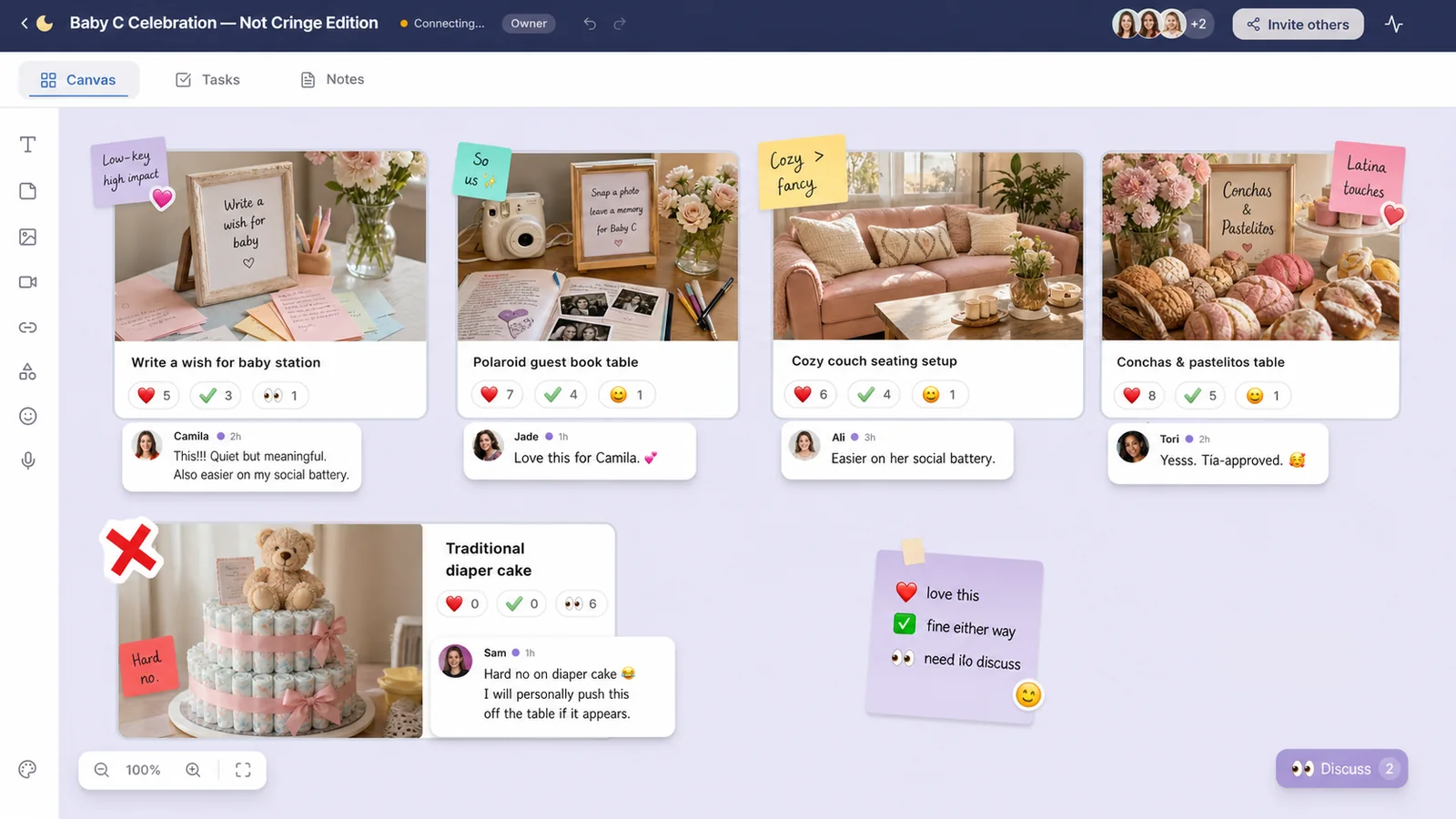
Decisions got made without anyone hunting through 200 messages.
Step 4: Turn the Vision Into Real Assignments (Without Killing the Fun)
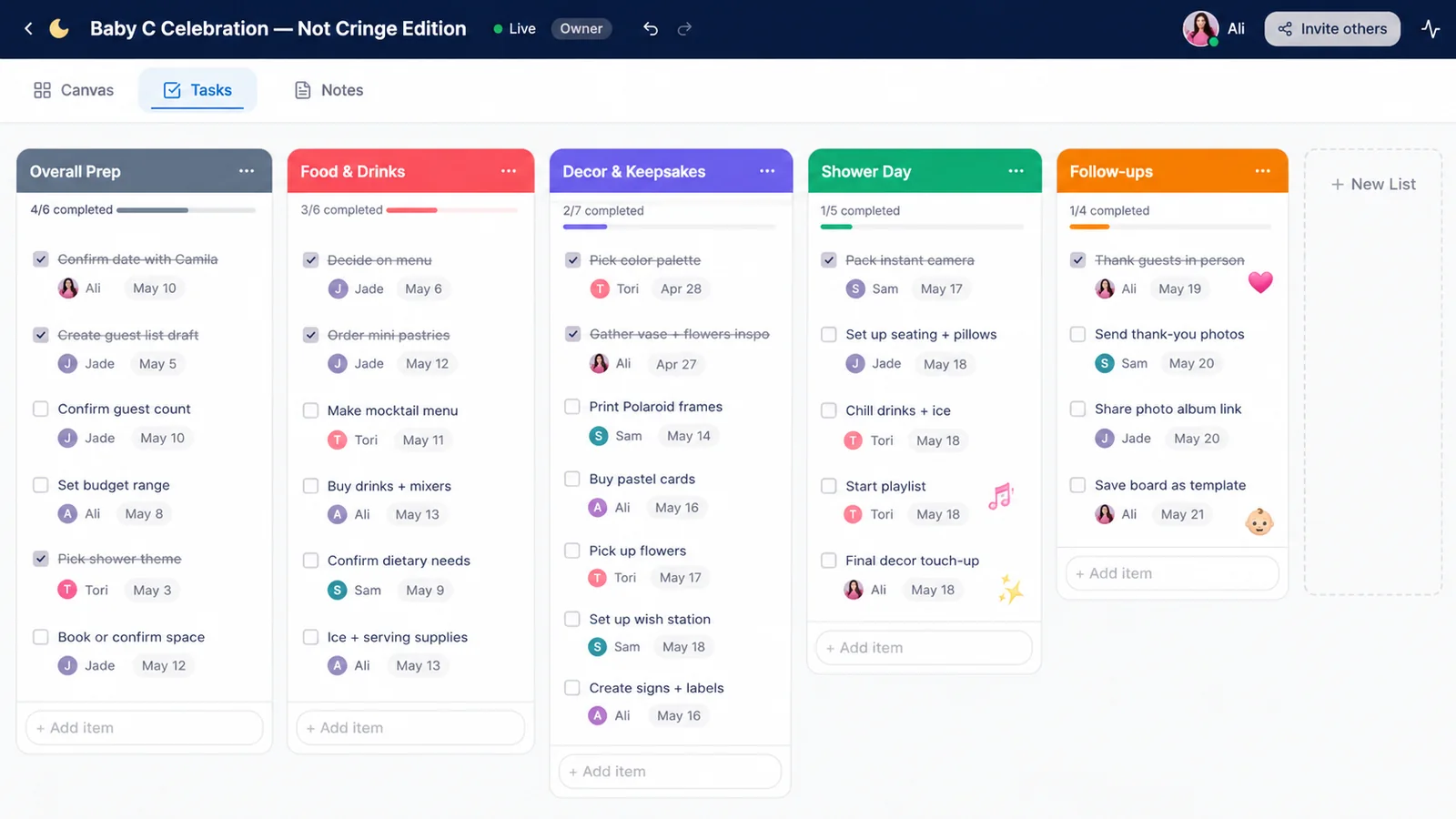
Once the vibe felt locked in, they added a small “To-Do, But Cute” column.
Each task card had:
- The thing: “Order mini pastries,” “Print Polaroid frames,” “Make playlist”
- Owner: avatar or initials
- Tiny due date in the corner
They didn’t build a Gantt chart. They just made sure nothing fell through the cracks. When someone finished a task, they slapped a big ✅ sticker on it.
They also used voice notes when typing felt like work:
- “I can handle desserts, my cousin works at a bakery.”
- “I’ll do the playlist - send me song suggestions here!”
The Shower Day: Vision Board to Reality
On the day of the shower:
- Guests wrote little notes to Baby C on pastel cards and clipped them to a string with mini clothespins.
- A Polaroid camera sat by the door, with a sign Jade had mocked up on the board: “Take a photo, leave a memory, eat a pastry.”
- Camila spent most of her time on the couch, not in front of everyone. People came to her.
Later, Jade added:
- Photos from the day back onto the LunaBoard
- A few screenshots of sweet texts from family after the party
- A text block labeled “Things We Want to Repeat for Future Showers/Weddings/Parties”
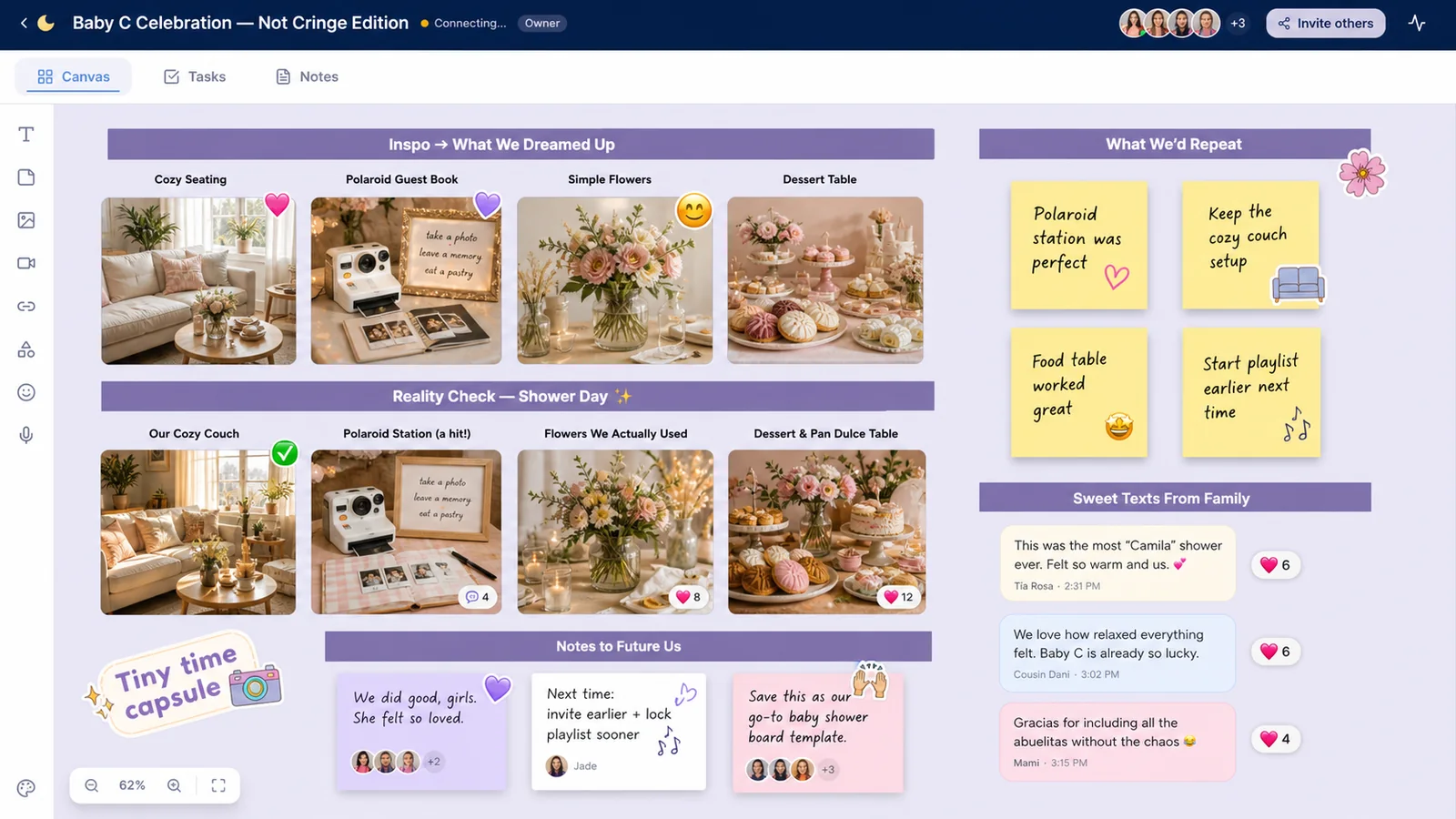
The board became a tiny time capsule and a template.
Frequently Asked Questions
Do I really need a baby shower vision board?
Need? No. But if you’re juggling multiple opinions, ideas, and Pinterest saves, a shared board gives everyone one place to see the vibe, contribute, and make decisions without chaos.
How do we keep the planning from becoming stressful?
Set constraints early: budget, guest count, and mom-to-be’s clear yes/no list. Keep the board fun with stickers and jokes, and only use as much structure (tasks, dates) as you truly need.
Can we reuse the board for other events?
Yes. You can duplicate successful sections (like “letters to baby,” playlist notes, or decor ideas) into future party boards - birthday, bridal shower, graduation. It becomes your group’s event brain.
What if our friend doesn’t like surprises?
Share the board with her from the beginning and let her react. Use 👀 and 🚫 reactions so she can quietly veto anything that doesn’t feel right, and welcome her input on comfort-level things like games, attention, and photos.
Conclusion & Gentle Next Step
Camila’s shower didn’t look like a baby store ad. It looked like her living room on its best day - full of people who knew her well enough to skip the diaper-sniffing competitions.
If you and your friends are planning a baby shower (or any celebration) and want it to feel like the person, not the Pinterest trend, give your ideas a shared canvas. Start a party planning board in LunaBoard and let everyone build something beautiful together, one sticky note at a time.